Beep test audio is the soundtrack of the 20m multi-stage fitness test. You run from one line to the other and need to be there by the next beep. About every minute the level goes up, the beeps come closer together, and on most versions a voice or a different tone tells you a new level has started.
If you are looking for audio to practise with, the recording itself matters less than how you play it. It needs to run at the right tempo, for the right lane length, without stopping halfway, and loud enough to hear at the far line. This page covers how the levels sound and what to check before you start.
The short version Level 1 beeps about every 8.5 seconds, and the gap gets shorter about every minute. Use audio made for a 20m lane, play it at normal speed, and make sure nothing can interrupt it.
How beep test audio with levels sounds
On the usual 20m Léger-style audio, level 1 runs at about 8.5 km/h. Covering 20 metres at that speed takes roughly 8.5 seconds, so that is the gap between beeps. Level 2 is 9.0 km/h, about 8 seconds a shuttle, and every level after that adds another 0.5 km/h.
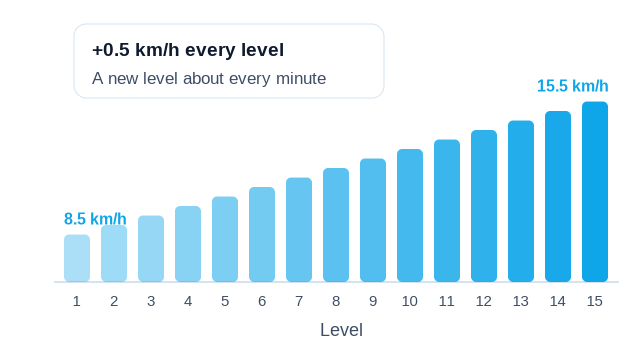 Each level adds 0.5 km/h, so the beeps arrive a little sooner every minute.
Because a level lasts about a minute, faster levels fit more shuttles in: about 7 on level 1 and 8 on levels 2 and 3. Most recordings mark the change with an announcement or a distinct tone, which is what people mean by “audio with levels”. The full list of speeds and shuttles is in beep test levels.
How long the audio lasts, and how long you will run
A full track is built for people who can reach the very top levels, so almost nobody hears it to the end. How long you run depends on where you stop, not on the length of the file.
Since each level takes about a minute, the level you reach is a rough guide to the minutes you ran. Stopping partway through level 5 means a little over four minutes of running. You finish when you stop yourself or miss the line twice in a row; the full rules are in how the 20m beep test works.
Why two recordings can feel different
If one track feels faster than the one you are used to, it is usually one of these:
- A different recording. Versions can differ slightly in where each level starts and how the beeps are spaced.
- A different lane. PACER test audio may be made for a 15m lane, which has a different cadence from a 20m track. The difference is explained in PACER vs the beep test.
- A changed playback speed. Video players remember speed settings. A track played at 1.25× is not a beep test any more.
Scores from different audio do not compare cleanly. Compare runs on the same recording and the same 20m lane.
Before you press play: a checklist for files and videos
An mp3 or a video works for practice, as long as it does not stop on you. Before you run:
- Listen to the start once, so you know what happens between the countdown and the first beep.
- Check whether a video can show adverts or play other sounds partway through.
- Make sure the screen turning off or a notification arriving will not pause playback.
- In a gym, check the beeps are clear at the far line, not just next to the speaker.
Gyms echo. Putting the speaker roughly halfway along the lane helps the beeps reach both ends. Setting up the lane itself is covered in how to set up a beep test.
Using a beep test app to play the audio and count
Running alone means listening, running and counting all at once, and the count is usually the first thing to go. BeepRun plays the 20m beep test audio and counts shuttles, level, distance and calories for you. The sound keeps going with the screen off.
Your runs are saved so you can look back at them. BeepRun also shows an estimated VO2max and compares you with age and sex averages; both are reference values, not a lab result.
The app cannot see whether your foot reached the line, so that part is up to you. Measure the 20m with a tape if you can. BeepRun’s AR gives a guide to about 20 metres, not an official measurement.
On test day, the tester’s audio is the one that counts
For a school test, a club session or a selection run, the person running it chooses the recording and the rules. If that is different from what you practised with, theirs is the one that counts. When the result matters, ask in advance which audio and lane length will be used, then practise with the same if you can.
A beep test ends close to your limit. Warm up properly first, and skip it on a day you feel unwell.
Quick answers
How often does the beep go on level 1?
On the usual 20m audio, level 1 runs at about 8.5 km/h, so there are roughly 8.5 seconds between beeps. Each level adds 0.5 km/h, so the gap shrinks a little about every minute.
Is PACER test audio the same as beep test audio?
Not always. Both are shuttle-run soundtracks, but the PACER can be run on a 15m lane with its own cadence, and a 15m track will not time a 20m lane correctly. Check which distance the audio was made for.
Will my score with an app match my score at school or a trial?
Not necessarily. A different recording, lane or counting rule can change the number. Use the audio and rules the tester sets on the day, and treat practice scores as a way to track your own progress.